

That could save your team time. It also gives an AI tool a new way into your business software. Before you connect anything, it helps to know how the connection works and what you would be allowing.
One way to make that connection is through the Model Context Protocol (MCP). Here is what it does, where it can help and what to check before using it.
What is MCP?
MCP is an open standard that lets AI assistants communicate with other software in a consistent way. Think of it as a common plug: your developers can make selected features of your application available through an MCP server, rather than building a different connection for every assistant.
In a typical setup, there are three parts: the AI assistant your staff use, an MCP server that offers information and actions, and your application, where the records, business rules and permission checks live.
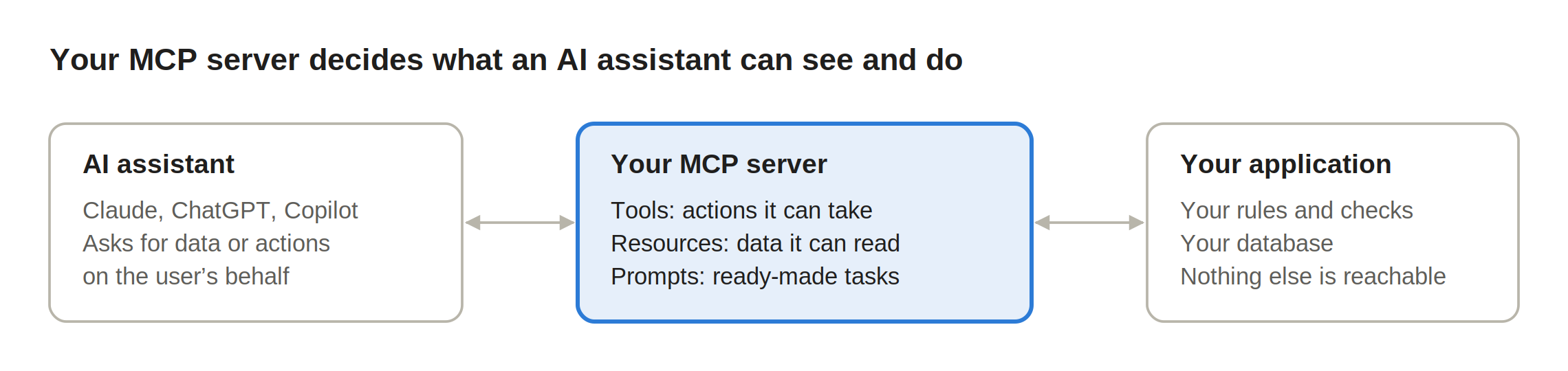
The MCP server can offer three types of feature:
Tools let the assistant request an action, such as finding an invoice or creating a booking.
Resources provide information, such as a price list or a document.
Prompts are reusable instructions for tasks, such as summarising a week’s enquiries.
There is an important catch: building one MCP server does not mean every AI assistant will connect to it automatically. Products differ in what they support and how they handle sign-in. Your server must also check who is asking and what that person is allowed to see or change. MCP does not replace your application’s own security.
Why is everyone talking about MCP?
Anthropic introduced MCP in November 2024. In December 2025, it donated the project to the Linux Foundation’s Agentic AI Foundation. Other major technology companies, including Google, Microsoft and OpenAI, support the foundation. That makes MCP a more credible long-term option than a connection built for one AI provider.
You can now use MCP with products including Claude, ChatGPT and Microsoft 365 Copilot. But support is not identical. One product may allow the assistant to look up information, while another also supports changing records. Features may depend on your subscription, administrator settings and the type of connection you build. Test the assistants your customers actually use before promising compatibility.
The standard is still changing. The latest published specification is dated 28 July 2026. That is a good reason to build carefully and allow time for maintenance, rather than assuming the integration will never need updating.
For developers, there are official toolkits for several languages, including C#, and Laravel has its own MCP package. It is often possible to add MCP to an existing application without rebuilding the whole system. Setting up authentication, permissions and testing properly is still real work.
When is MCP worth adding?
Imagine a letting agent asking, “Which properties have gas safety certificates expiring next month?” Instead of searching the property system, the agent asks an AI assistant, which checks the records and returns the answer. That could be genuinely useful, especially when staff need information from several systems during the day.
MCP is worth considering if:
your customers or staff already use AI assistants for work and have asked for this connection
the first tasks are simple look-ups, summaries or drafts
people spend time moving between systems to find the same information
you can show a clear time saving or another useful benefit
It may be better to wait if:
a better search, report or dashboard in your own app would solve the problem
the information is particularly sensitive and the benefit is limited
the main tasks involve payments, deletions or other changes that are hard to reverse
your existing access permissions are not reliable
you do not have the time or budget to support another integration
There is no need to add MCP simply because it is new. For many businesses, the sensible choice is to keep the option open while improving the basics of the application they already have.
The risks to think about
An MCP server is another route into your system. It can be built safely, but adding the protocol does not automatically make your software secure.
Customer data leaving your system. When you use a cloud-based AI assistant, information returned through MCP may be processed by that assistant’s provider. Check what is sent, where it is processed, how long it is kept and which account terms apply. Local or self-hosted setups can work differently. See our guide: what happens to your customer data when you add AI to a business app.
Too much access. Do not give an assistant a single account that can see everything. Use each person’s existing permissions, and make sure users from one customer or branch cannot get to another customer’s records unless they are entitled to.
Hidden instructions in content. A malicious email or document can contain text intended to mislead an assistant. This is called prompt injection. An assistant that reads such a message and can also send emails or change records needs extra safeguards.
Changes made without proper checks. Sending a message, changing a record or deleting something can have consequences. Show people what an important action will do and ask for approval. The application must still reject requests that the person is not authorised to make.
Wrong or incomplete answers. An assistant may misunderstand a question or miss a record. For anything important, people should be able to check the result against the original system.
How to start safely
Start with something small that people already need, and make sure you can turn the connection off quickly if there is a problem.
Choose one useful task. Checking the status of a booking or finding an invoice is enough for a first version.
Start with read-only access. See whether people actually use it before allowing changes.
Keep access tied to the person. Use proper sign-in and authorisation, so the assistant gets no more access than the person already has.
Require approval for important actions. Show the proposed change clearly and let the person accept or reject it.
Keep an audit trail without copying everything. Log who used which tool, when and whether it worked. Avoid putting full customer records or unnecessary personal data into logs.
Check the AI provider and account. Decide which assistants staff may use and review their security, data retention and contract terms.
Review your data protection duties. Check whether privacy information, provider agreements or international transfer arrangements need updating. Carry out a data protection impact assessment if the planned use is likely to be high risk.
This is the work we focus on in AI integration projects at Niletech. The technical connection is only part of the job. You also need to decide what the assistant can access, which actions need approval and whether the benefit justifies the ongoing cost. If that is still unclear, our three-week AI discovery sprint can help test an idea before you commit to a full build.
So, should you add MCP?
MCP is worth understanding, but it is not an automatic upgrade for every business application. If staff are already using AI assistants and there is a specific job the connection would make easier, start with a small, read-only test. If your existing software could do the job just as well, fix that first.
If you are considering an MCP connection for your software, we can talk through the options. Book a 30-minute call or send us a short project brief. You will speak to the person who would work on it.
Sources and further reading
Checked on 30 October 2026. Product features and MCP specifications may change.